Sage Copilot
Your AI-powered assistant for smarter inventory planning
Sage Copilot for Inventory Planner, an AI assistant powered by Sage Ai, helps inventory planners make better replenishment and purchasing decisions by highlighting key insights, flagging potential stock issues early, and guiding the next steps directly within Inventory Planner.
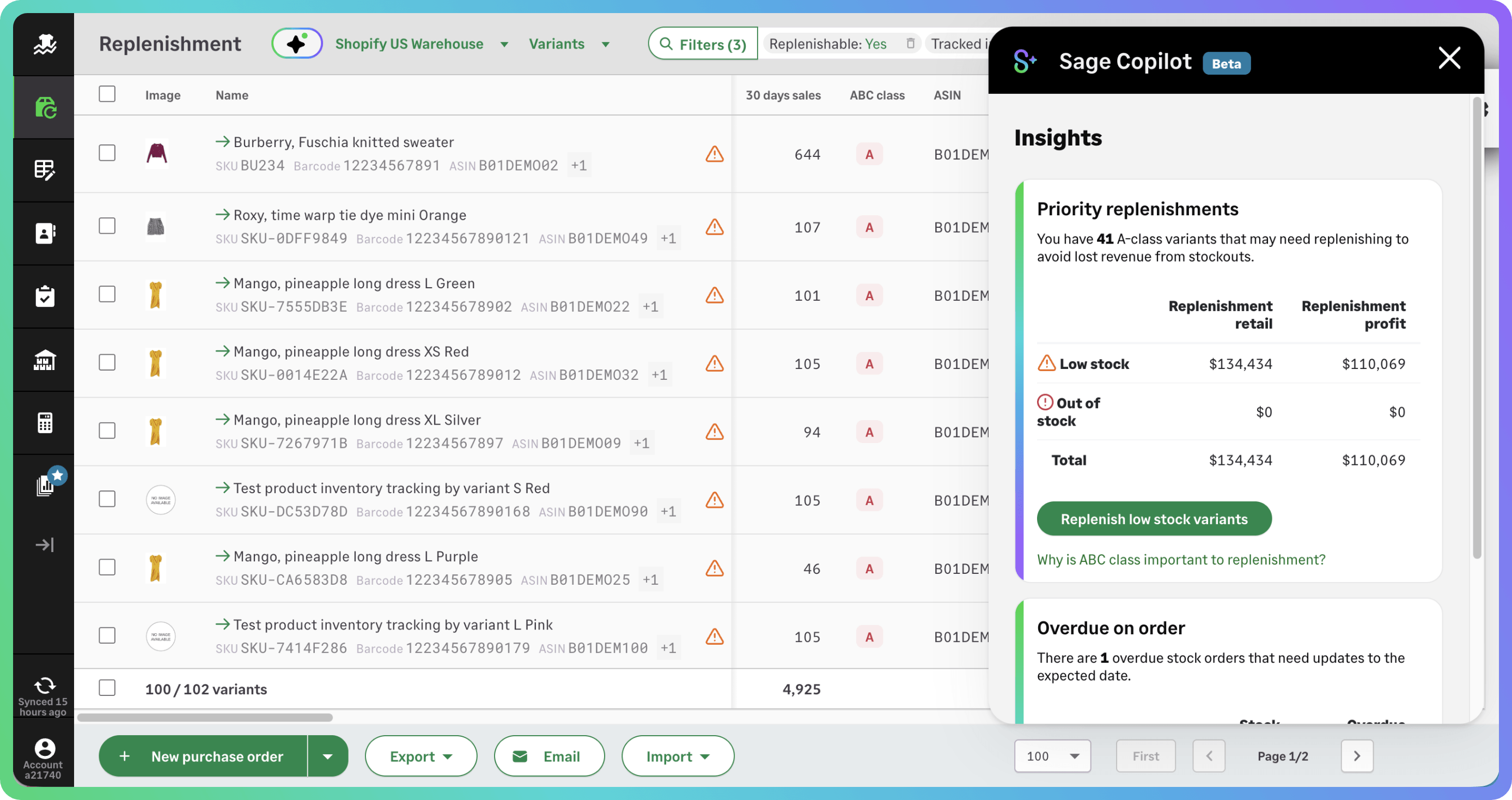
What is Sage Copilot for Inventory Planner?
Sage Copilot for Inventory Planner is your new productivity assistant, powered by Sage Ai. It appears directly in your workflow to highlight key insights, flag stock issues early, and guide your next steps, so you can make better replenishment and purchasing decisions without wading through reports or second-guessing the data.
The Retail Intelligence Agent powers those insights. It reviews your inventory data and flags the items that need attention, such as products you should reorder first or missing cost prices that could affect margins.
Meet our Retail Intelligence Agent
The Retail Intelligence Agent is an AI-powered capability within Sage Copilot for Inventory Planner, built specifically for inventory planning.
It helps you understand what needs attention across your inventory, from products worth reordering first to anomalies that could affect planning accuracy.
By flagging issues that are easy to miss during day-to-day planning, the Retail Intelligence Agent helps you respond quickly and keep inventory levels, availability, and margins on track.
Insights include:
Priority replenishments so you know which products to reorder first
Value review for stock orders so you can check your purchasing decisions
Overdue on-order items showing late deliveries that could affect stock availability
Missing cost prices highlighting products without cost data that may affect margins
Built-in guidance to keep your planning on track
Sage Copilot provides guidance directly within Inventory Planner, helping planners complete tasks with confidence and follow best practices.
Step-by-step support appears where you need it when setting up inventory, reviewing replenishment, or changing settings. This means less time searching for help and less time training new users.
For growing retail teams, this leads to faster onboarding, fewer mistakes, and more consistent ways of working. Retailers can start using new features more easily and manage increasingly complex inventory without running into issues.

How Sage Copilot for Inventory Planner helps
Sage Copilot for Inventory Planner, powered by Sage Ai, helps supply chain managers plan inventory with more clarity and confidence.

Know what to reorder first
Sage Copilot highlights the products that need attention first, helping retailers decide what to reorder and where to focus their purchasing.

Keep inventory data accurate
It flags missing information and unusual patterns that could affect forecasts, margins, or stock availability.

Respond faster to inventory issues
Retailers can quickly spot supplier delays, changes in demand, or risks to margins and take action sooner.
Powered by Sage Ai
Sage Copilot for Inventory Planner is powered by Sage Ai.
Sage Ai is built into Sage products and designed for real business workflows, including retail and inventory planning. It uses Sage’s business expertise and customer data to turn everyday inventory information into practical insights, helping teams spot issues, reduce manual work, and make better purchasing decisions.
For retailers, that means AI that understands the work behind stock, replenishment, margins, and availability.